
 Simone
忘记WPS工作表当中的撤消密码怎么办?
的有关信息介绍如下:下面是步骤方法:
1、打开需要破解保护密码的Excel文件;
2、依次点击菜单栏上的工具---宏----录制新宏,输入宏名字如:aa;
3、停止录制(这样得到一个空宏);
4、依次点击菜单栏上的工具---宏----宏,选aa,点编辑按钮;
5、删除窗口中的所有字符(只有几个),替换为下面的内容;
从下面英文开始复制:
Option Explicit
Public Sub AllInternalPasswords()
' Breaks worksheet and workbook structure passwords. Bob McCormick
' probably originator of base code algorithm modified for coverage
' of workbook structure / windows passwords and for multiple passwords
'
' Norman Harker and JE McGimpsey 27-Dec-2002 (Version 1.1)
' Modified 2003-Apr-04 by JEM: All msgs to constants, and
' eliminate one Exit Sub (Version 1.1.1)
' Reveals hashed passwords NOT original passwords
Const DBLSPACE As String = vbNewLine & vbNewLine
Const AUTHORS As String = DBLSPACE & vbNewLine & _
"Adapted from Bob McCormick base code by" & _
"Norman Harker and JE McGimpsey"
Const HEADER As String = "AllInternalPasswords User Message"
Const VERSION As String = DBLSPACE & "Version 1.1.1 2003-Apr-04"
Const REPBACK As String = DBLSPACE & "Please report failure " & _
"to the microsoft.public.excel.programming newsgroup."
Const ALLCLEAR As String = DBLSPACE & "The workbook should " & _
"now be free of all password protection, so make sure you:" & _
DBLSPACE & "SAVE IT NOW!" & DBLSPACE & "and also" & _
DBLSPACE & "BACKUP!, BACKUP!!, BACKUP!!!" & _
DBLSPACE & "Also, remember that the password was " & _
"put there for a reason. Don't stuff up crucial formulas " & _
"or data." & DBLSPACE & "Access and use of some data " & _
"may be an offense. If in doubt, don't."
Const MSGNOPWORDS1 As String = "There were no passwords on " & _
"sheets, or workbook structure or windows." & AUTHORS & VERSION
Const MSGNOPWORDS2 As String = "There was no protection to " & _
"workbook structure or windows." & DBLSPACE & _
"Proceeding to unprotect sheets." & AUTHORS & VERSION
Const MSGTAKETIME As String = "After pressing OK button this " & _
"will take some time." & DBLSPACE & "Amount of time " & _
"depends on how many different passwords, the " & _
"passwords, and your computer's specification." & DBLSPACE & _
"Just be patient! Make me a coffee!" & AUTHORS & VERSION
Const MSGPWORDFOUND1 As String = "You had a Worksheet " & _
"Structure or Windows Password set." & DBLSPACE & _
"The password found was: " & DBLSPACE & "$$" & DBLSPACE & _
"Note it down for potential future use in other workbooks by " & _
"the same person who set this password." & DBLSPACE & _
"Now to check and clear other passwords." & AUTHORS & VERSION
Const MSGPWORDFOUND2 As String = "You had a Worksheet " & _
"password set." & DBLSPACE & "The password found was: " & _
DBLSPACE & "$$" & DBLSPACE & "Note it down for potential " & _
"future use in other workbooks by same person who " & _
"set this password." & DBLSPACE & "Now to check and clear " & _
"other passwords." & AUTHORS & VERSION
Const MSGONLYONE As String = "Only structure / windows " & _
"protected with the password that was just found." & _
ALLCLEAR & AUTHORS & VERSION & REPBACK
Dim w1 As Worksheet, w2 As Worksheet
Dim i As Integer, j As Integer, k As Integer, l As Integer
Dim m As Integer, n As Integer, i1 As Integer, i2 As Integer
Dim i3 As Integer, i4 As Integer, i5 As Integer, i6 As Integer
Dim PWord1 As String
Dim ShTag As Boolean, WinTag As Boolean
Application.ScreenUpdating = False
With ActiveWorkbook
WinTag = .ProtectStructure Or .ProtectWindows
End With
ShTag = False
For Each w1 In Worksheets
ShTag = ShTag Or w1.ProtectContents
Next w1
If Not ShTag And Not WinTag Then
MsgBox MSGNOPWORDS1, vbInformation, HEADER
Exit Sub
End If
MsgBox MSGTAKETIME, vbInformation, HEADER
If Not WinTag Then
MsgBox MSGNOPWORDS2, vbInformation, HEADER
Else
On Error Resume Next
Do 'dummy do loop
For i = 65 To 66: For j = 65 To 66: For k = 65 To 66
For l = 65 To 66: For m = 65 To 66: For i1 = 65 To 66
For i2 = 65 To 66: For i3 = 65 To 66: For i4 = 65 To 66
For i5 = 65 To 66: For i6 = 65 To 66: For n = 32 To 126
With ActiveWorkbook
.Unprotect Chr(i) & Chr(j) & Chr(k) & _
Chr(l) & Chr(m) & Chr(i1) & Chr(i2) & _
Chr(i3) & Chr(i4) & Chr(i5) & Chr(i6) & Chr(n)
If .ProtectStructure = False And _
.ProtectWindows = False Then
PWord1 = Chr(i) & Chr(j) & Chr(k) & Chr(l) & _
Chr(m) & Chr(i1) & Chr(i2) & Chr(i3) & _
Chr(i4) & Chr(i5) & Chr(i6) & Chr(n)
MsgBox Application.Substitute(MSGPWORDFOUND1, _
"$$", PWord1), vbInformation, HEADER
Exit Do 'Bypass all for...nexts
End If
End With
Next: Next: Next: Next: Next: Next
Next: Next: Next: Next: Next: Next
Loop Until True
On Error GoTo 0
End If
If WinTag And Not ShTag Then
MsgBox MSGONLYONE, vbInformation, HEADER
Exit Sub
End If
On Error Resume Next
For Each w1 In Worksheets
'Attempt clearance with PWord1
w1.Unprotect PWord1
Next w1
On Error GoTo 0
ShTag = False
For Each w1 In Worksheets
'Checks for all clear ShTag triggered to 1 if not.
ShTag = ShTag Or w1.ProtectContents
Next w1
If ShTag Then
For Each w1 In Worksheets
With w1
If .ProtectContents Then
On Error Resume Next
Do 'Dummy do loop
For i = 65 To 66: For j = 65 To 66: For k = 65 To 66
For l = 65 To 66: For m = 65 To 66: For i1 = 65 To 66
For i2 = 65 To 66: For i3 = 65 To 66: For i4 = 65 To 66
For i5 = 65 To 66: For i6 = 65 To 66: For n = 32 To 126
.Unprotect Chr(i) & Chr(j) & Chr(k) & _
Chr(l) & Chr(m) & Chr(i1) & Chr(i2) & Chr(i3) & _
Chr(i4) & Chr(i5) & Chr(i6) & Chr(n)
If Not .ProtectContents Then
PWord1 = Chr(i) & Chr(j) & Chr(k) & Chr(l) & _
Chr(m) & Chr(i1) & Chr(i2) & Chr(i3) & _
Chr(i4) & Chr(i5) & Chr(i6) & Chr(n)
MsgBox Application.Substitute(MSGPWORDFOUND2, _
"$$", PWord1), vbInformation, HEADER
'leverage finding Pword by trying on other sheets
For Each w2 In Worksheets
w2.Unprotect PWord1
Next w2
Exit Do 'Bypass all for...nexts
End If
Next: Next: Next: Next: Next: Next
Next: Next: Next: Next: Next: Next
Loop Until True
On Error GoTo 0
End If
End With
Next w1
End If
MsgBox ALLCLEAR & AUTHORS & VERSION & REPBACK, vbInformation, HEADER
End Sub
-------------------
复制到横线以上
6、关闭编辑窗口;
7、依次点击菜单栏上的工具---宏-----宏,选AllInternalPasswords,运行,确定两次;
8、 等一会,就会出现以下对话框:这就是Excel密码对应的原始密码(此密码和原先设置的密码都能打开此文档。如果是别人的文档,又想恢复密码设置,就可以用此密码进行保护,就能用设置的密码打开。字母一定要大写):
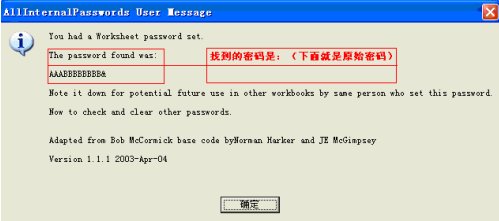
再点击确定。Excel的原始密码就被清除了。